

Notice: M1 Mac Users Experiencing RX Update Failure
Some users may experience an issue updating their Receivers on an M1 Mac. The primary symptom is that the Inertia Wheels will be able to update, but the Receiver will fail. The issue is limited to certain units and certain computer models.
If you experience this issue, please contact support by using Help > Chat with Support. We will officially diagnose the issue and provide a resolution.
Firmware Release
Inertia Wheels Firmware V2.6.1
Notice: Movi Pro/XL Users
Movi Pro/XL users should plug the wheels into COM1. COM2 does not work properly with the Inertial Algorithm and may lead to the control signal dropping out.
Changes since version 2.4.8
This release adds Dashboard FN Pages, revised motion controls, native TORQ leveling, and support for Optical G2 motors. It also improves shortcut handling and reduces interruptions caused by runtime logging during operation.
All Changes
Dashboard FN Pages
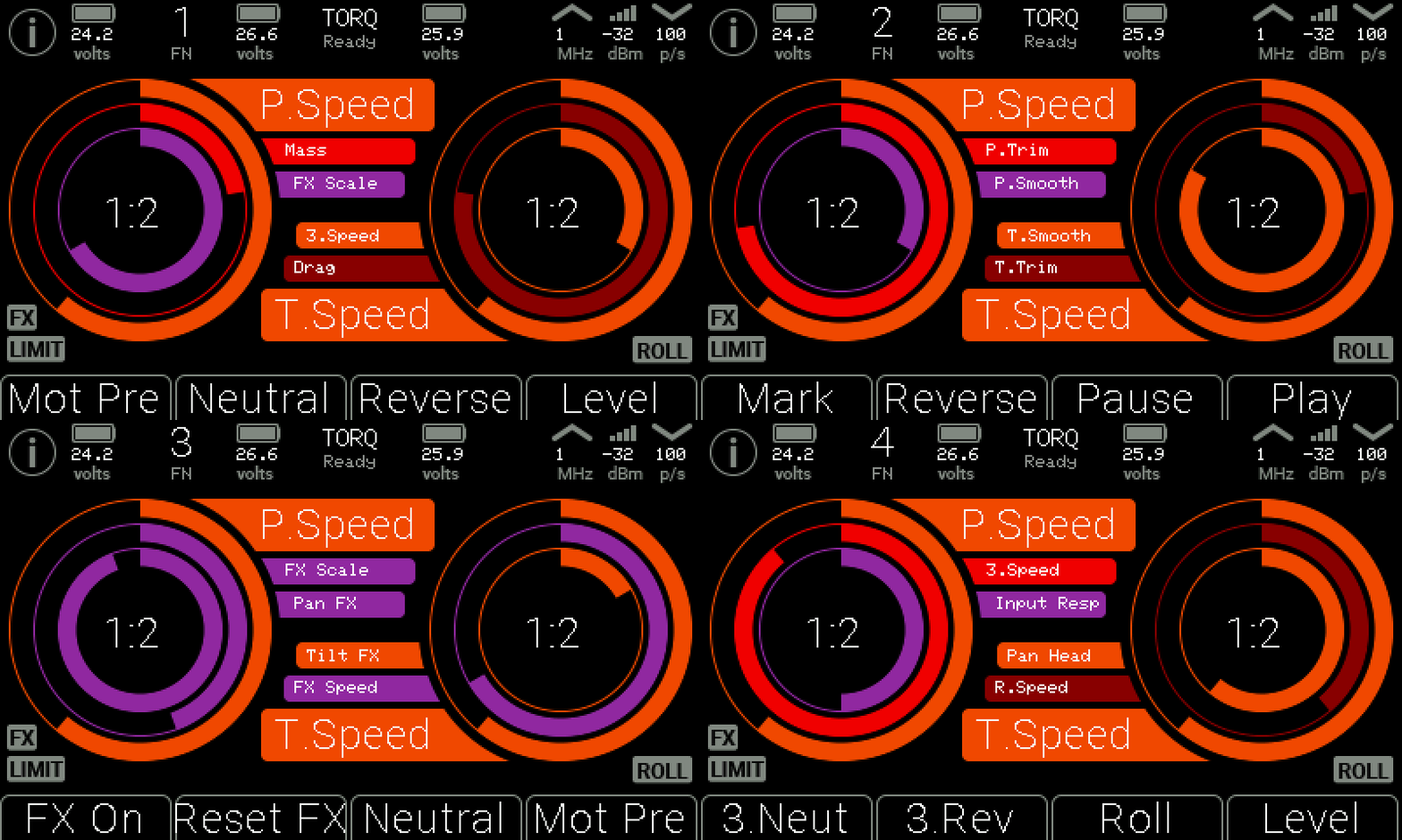
NEW: Configure up to four shortcut pages under Dashboard > FN 1–4.
Briefly press PWR/FN while viewing the dashboard to cycle through configured pages. The active FN page is shown on screen.
Each page has its own assignments for Buttons 1–4 and the second and third selectable functions on each knob. Knob Left 1 and Knob Right 1 remain shared across all pages.
Additional pages can be deleted, with later pages moving down automatically.
FN Pages store shortcut assignments. A setting assigned to multiple pages keeps the same value across those pages.
Pan and Tilt Motion Controls
Adaptive Dampening is now called Max Acceleration and uses values in degrees per second squared. Higher values allow faster acceleration; INF disables the additional acceleration limit.
Limit Softening is now called Limit Deceleration and also uses degrees per second squared. Higher values produce firmer stops.
Acceleration calculations now account for the selected update rate, keeping the configured limits consistent between Range and Fast modes.
Limit Deceleration is constrained by Max Acceleration when a finite acceleration limit is selected.
These changes apply to pan and tilt. Third Axis damping and limits retain their existing behavior.
TORQ / TAMBR
Added native Level Now control, available through the menu and as a dashboard button shortcut.
Level Now sends the head’s leveling command through either the local connection or the receiver.
TORQ uses its native leveling action without also generating a separate wheel-controlled roll move.
The existing leveling action for other outputs is labeled Move to Level.
Optical G2 Motor Support
Added support for Optical G2 motors, with compensation values tuned for the newer motor hardware.
About > Motors now identifies Optical G1 or Optical G2.
Optical generation identification is retained when switching between Original Brushless and MAX motor modes.
General Fixes
Corrected roll-speed ratio scaling for local outputs. Higher ratios now produce slower roll movement.
Improved long shortcut labels so they fit within their menu rows.
Shortcuts that are unavailable for the selected output are retained but cannot be activated while unavailable.